AI PR Reviewer

& DevOps Practitioner
& DevOps Practitioner
- local vars
PAYLOAD_SECRET=61318b8cca7ae3a04b19aee2
DATABASE_URI=file:./payload.db
DATABASE_AUTH_TOKEN=your-auth-token
REVALIDATION_SECRET=your-local-revalidation-secret
NEXT_PUBLIC_SITE_URL=http://localhost:3000
Issue: Accidentally ran payload migrate:reset on QA turso db
Luckily the qa.sizzle.audio frontend reads from the cache therefore we could still see the videos that should be displayed:
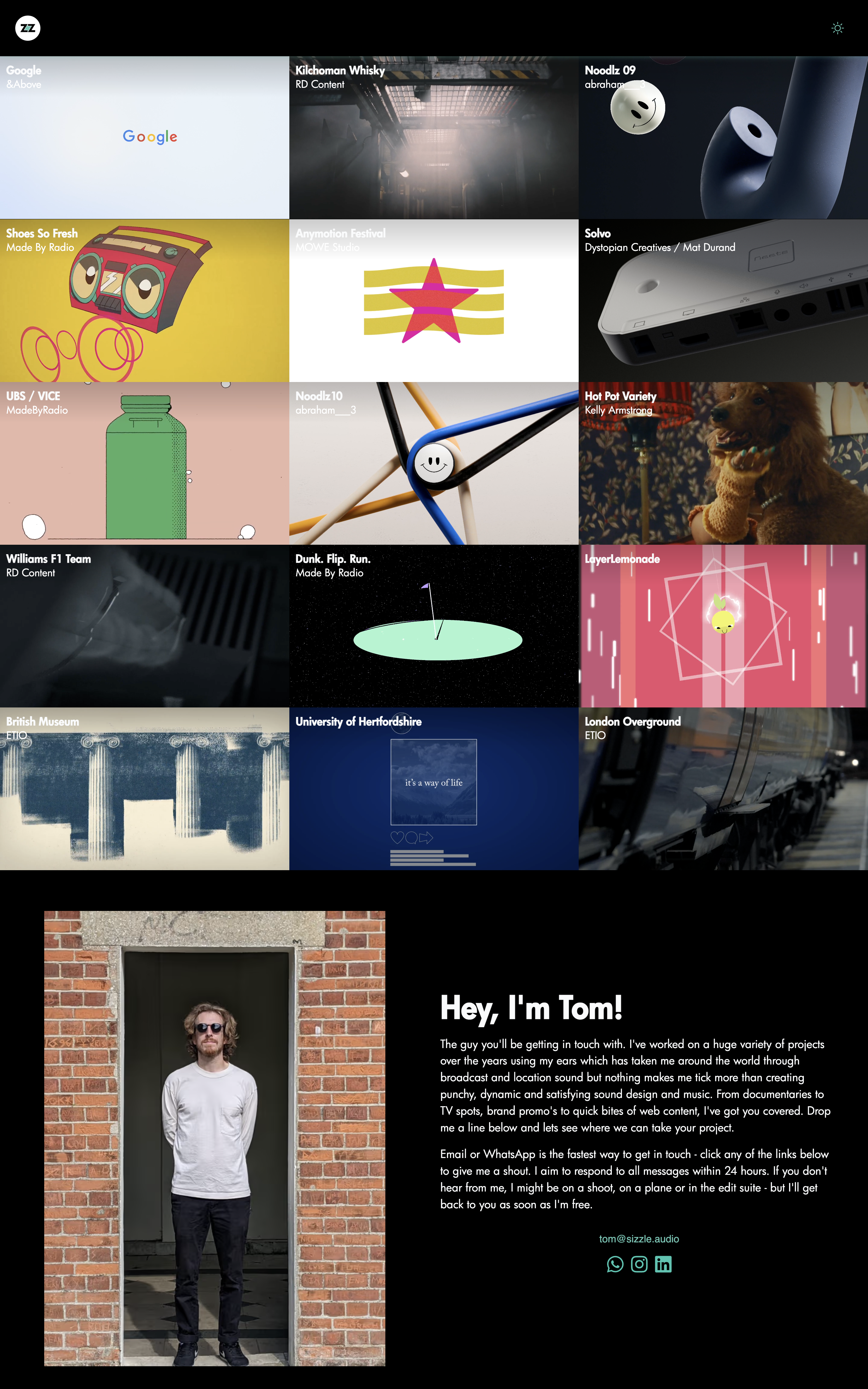
We identified the QA S3 bucket from a deploy pipeline in github actions:
> frontend@0.1.0 build
> payload generate:importmap && payload generate:types && next build

[dotenv@17.0.1] injecting env (0) from .env – [tip] encrypt with dotenvx: https://dotenvx.com
🔍 Environment Variables during migration:
PAYLOAD_SECRET: 5af4c39b2c...
DATABASE_URI: ***
DATABASE_AUTH_TOKEN: ***
NODE_ENV: undefined
S3_BUCKET: sizzle-audio-qa-mediabucketbucket-vkvmmmor # QA S3 bucket
S3_REGION: us-east-1
AWS_ACCESS_KEY_ID: ***
AWS_SECRET_ACCESS_KEY: ***
S3_ACCESS_KEY_ID: ***
S3_SECRET_ACCESS_KEY: ***
---
The next step was downloading each video, storing them locally (screenshot below) and re-creating the entries in the video collection.

Just as I had downloaded the video for Google, I realised that all video items in a collection are simply linked to the media collection and this table was still intact, as were the others, so a quick test of creating one and all we need to do is create each video item and link it to relevant video, video clip and thumbnail media items!

And by keeping a copy of the main page open to the left whilst refreshing the one to the right after each video collection item was added, we could keep track of what's left to re-create:

Read local payload.db data
- Open SQLite CLI
cd packages/frontend && sqlite3 payload.db
example:
❯ cd packages/frontend && sqlite3 payload.db
SQLite version 3.43.2 2023-10-10 13:08:14
Enter ".help" for usage hints.
sqlite>
- Show tables
sqlite> .tables
about                          payload_preferences_rels
media                          social_links
payload_locked_documents       users
payload_locked_documents_rels  users_sessions
payload_migrations             videos
payload_preferences
- Select all from users
.mode column
.headers on
.width 5 30 25 25
SELECT id, email, datetime(created_at) as created, datetime(updated_at) as updated FROM users;
example:
sqlite> .mode column
sqlite> .headers on
sqlite> .width 5 30 25 25
sqlite> SELECT id, email, datetime(created_at) as created, datetime(updated_at) as updated FROM users;
id     email                           created                    updated
-----  ------------------------------  -------------------------  -------------------------
1      osullivanj.01@gmail.com         2025-07-08 12:07:40        2025-08-16 18:18:51
example 2 with -json flag piped to json_pp:
❯ sqlite3 -json payload.db "SELECT * from users;" | json_pp
[
   {
      "created_at" : "2025-07-08T12:07:40.410Z",
      "email" : "osullivanj.01@gmail.com",
      "hash" : "669864ae5686077c8ec24e19ad818320bdd484ddf083eca279fb6a4e66205053deb32a83bc6f034d375208b200de9a6ee0b4c10fb2217b7245a584630706021fc1e853b4bb271543c69cba5c524e6ccfcbe40a6a7118a587e726c840d15e814cfe0b0f010f4599aa7acef39a53eac56881c8298158e9fd17c09f090f66dd91c25ed019e49d46d81f99389fd4c09ab208c7aa350b57374f4e64f8ddfc79b93cf4fa25f6f07a1168d67e3b2692921ad0812337394051c9e901841dcadf12aa2ddcde8f698f9ce77471c407fb4b3001ccd42222d4ddd59cde1b473bdc322068fe133a7180de9e2edba52f472efe674b7be779c7129ce936941e9bd26a786445343aaa2228f019cbb9f95871784eba20c06d849d9a1c690492671611234de2b3d5df8ad85f0ec331fd047788229d98f0b74524ade30cd219e7dc70b3ea15a20a2bdd257018d54468e490f0473612d79c9e91ef74b858421e3f6b7b199ebbbb8630818095f993092ff96396840c07dfca1aad96e45541bdfabb5d3192ecc344d408ad29ad07c35ba0a74a59d76316be16512692c7f39542934e86269b8ed115b92cceceebf208b652bb23376e0d4d6040b08b9670dd1423de53d2973b21f4e647297f3611c1be0e26ac62eccc8ccd8a5a1050f7e7612a284da79a4187385c75fddac8b9d81398d9c4be9be8bd40885cde0b23ccbe66c03cc400dcaf21181da245c951",
      "id" : 1,
      "lock_until" : null,
      "login_attempts" : 0,
      "reset_password_expiration" : null,
      "reset_password_token" : null,
      "salt" : "5448f8576388aaeab305a1e4f3d89be83d3db0453c017dbdccb7d5842e0ff9bb",
      "updated_at" : "2025-08-16T18:18:51.711Z"
   }
]
example 3, on qa-backup.sql (see below on how to export from turso):
❯ sqlite3 -json qa-backup.sql "SELECT * from users;" | json_pp
[
   {
      "created_at" : "2025-07-14T19:36:42.780Z",
      "email" : "admin@sizzle.audio",
      "hash" : "8cd3169984abcba479ed2c5c5a7337a496062c6311116e985086578d0001b5fbfa226a16202bc5e8cfbd60844fe8f26159c3cffda56106c59d648179cb9db2b47c0d98a7fcff87b17adb8ec3eafc590535a49a5dd396a499137ef1f43da3c6a2a8c61fd89724dac6c6921c8f6f6acfe20e45ca824766d2b58681efbb4e0351a7b6bb1ccc7a7d9d06c1b5b16d6048b2ca8c5062c060c834a56c84f9196604a910a321886d07eb57a839f8f74ec43ab09654bc7ff5b4dad90b46cad50722b4c0f3d4b27afa9f92ee2269326521a988bab20cd643cce08a8b12d7963910c5dbf28f6670c711ece50e3f1cf6467472a9832871f8a3feac2f9d5638704cbeb212ee7f7eceeeaad9ff06f130edb9b1e9bf71ce266129efdef04c35990082474a6667131dd7a4e844d946ea1af015ea62059605a7d74488dffb9223f1edab329ebfb2add9a54335d00d24f24df9ab17e91d4795acf3b00ed64d5119a0c1b009d98c0f9689a6d3c7d72fb32eb65f4d6ebe7127fe701a11fbcc8368663e80e89e40f0e7f3cbabd75aa2cc5b0727eccd811c34667b96217599b92ecf0bf489952cf7c6ba31c55bb4d09b2df6a72ff9cbad314ef63fd30650d74ceb657b5cd69078edefb3d1bdd151b533adf469a237bbae4d39d56e6d2d9e6f24932e52fa37abbb53da7d6a8cd52f4e2260f9b119f949ab1513960f2ad2a85535078461e56d26746a7e4327",
      "id" : 1,
      "lock_until" : null,
      "login_attempts" : 0,
      "reset_password_expiration" : null,
      "reset_password_token" : null,
      "salt" : "0643be2e1016d0f4c8767ce286e64624d491a65dcde909c41cb55c46fe68b9cd",
      "updated_at" : "2025-08-16T11:27:03.125Z"
   }
]
- Local payload.db login details
Username: osullivanj.01@gmail.com Password: Red-21-Fox!?Arpeggio2
- DB Browser for SQLite (Free & Recommended)
brew install --cask db-browser-for-sqlite
open -a "DB Browser for SQLite" payload.db

- Create a backup of turso dbs
Login and list dbs:
❯ turso auth login
Opening your browser at:
https://api.turso.tech?port=57135&redirect=true&state=iFxPNF3CMcFfQsPtsF7pK1JX98RzmtIe&type=cli
Waiting for authentication...
✔  Success! Logged in as jonsully1
❯ turso db list
NAME                GROUP      URL
sizzleaudio         default    libsql://sizzleaudio-jonsully1.aws-eu-west
sizzleaudio-prod    default    libsql://sizzleaudio-prod-jonsully1.aws-eu
Export dbs:
❯ turso db export  sizzleaudio --output-file qa-backup.sql
Exported database to qa-backup.sql
❯ turso db export  sizzleaudio-prod --output-file prod-backup.sql
Exported database to prod-backup.sql
Store them locally in:
/Users/johnosullivan/Documents/personal/_career/freelance/small business websites/sizzle.audio